THE FREE WORDPRESS PLUGIN FOR RESTAURANT ORDERING

An online ordering system for your restaurant.
From menu to kitchen.

Take pickup, delivery, takeaway and dine-in orders on your own WordPress website. Free core plugin. No RestroPress order commission.

For your customers

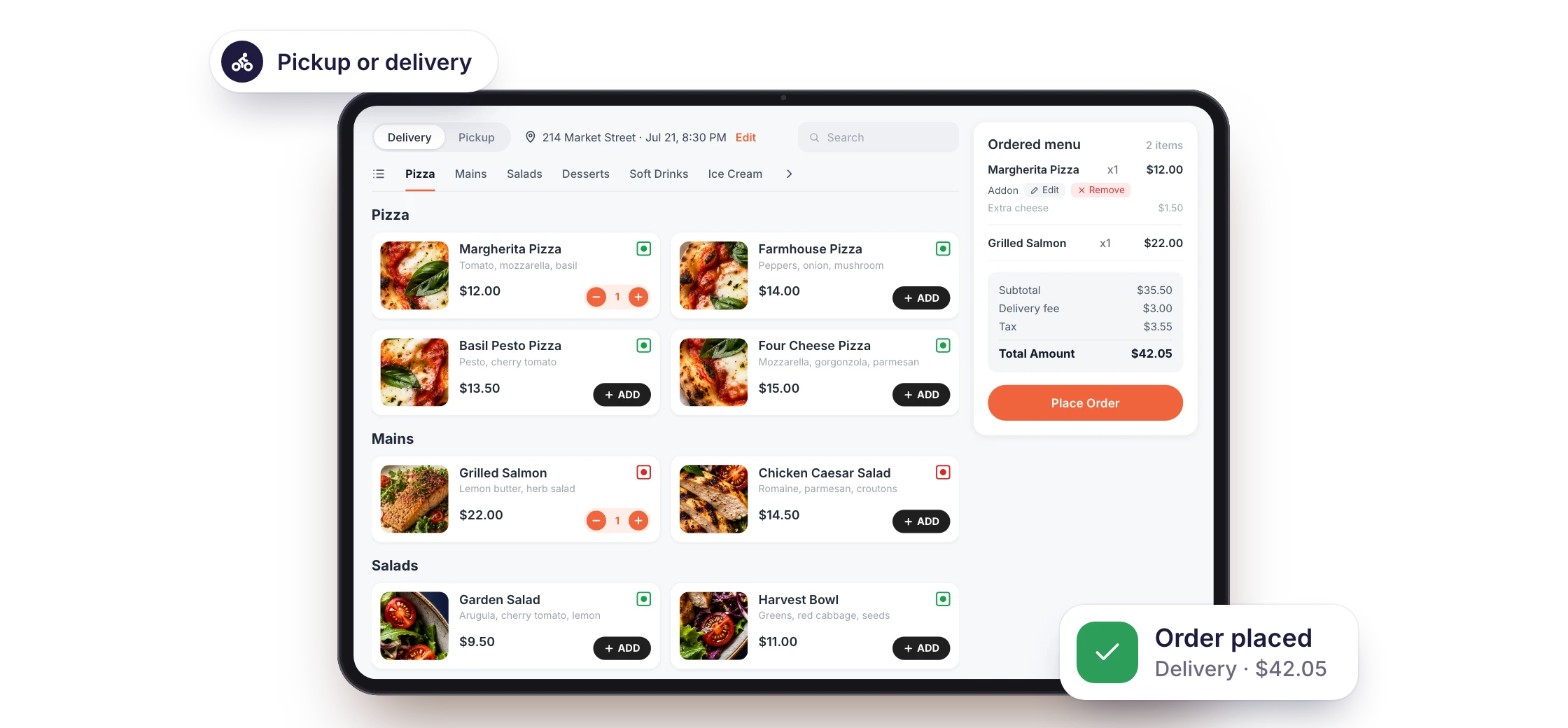
Browse a real menu, choose pickup or delivery, and try the checkout.

WordPress website required.

Free core for pickup and delivery. Dine-in is a paid extension; app, hosting and payment costs may apply.

RestroPress online ordering on a tablet: menu categories, a Delivery or Pickup choice and the cart, with a Pickup or delivery label and an Order placed confirmation.
Screens shown with sample data

For your team

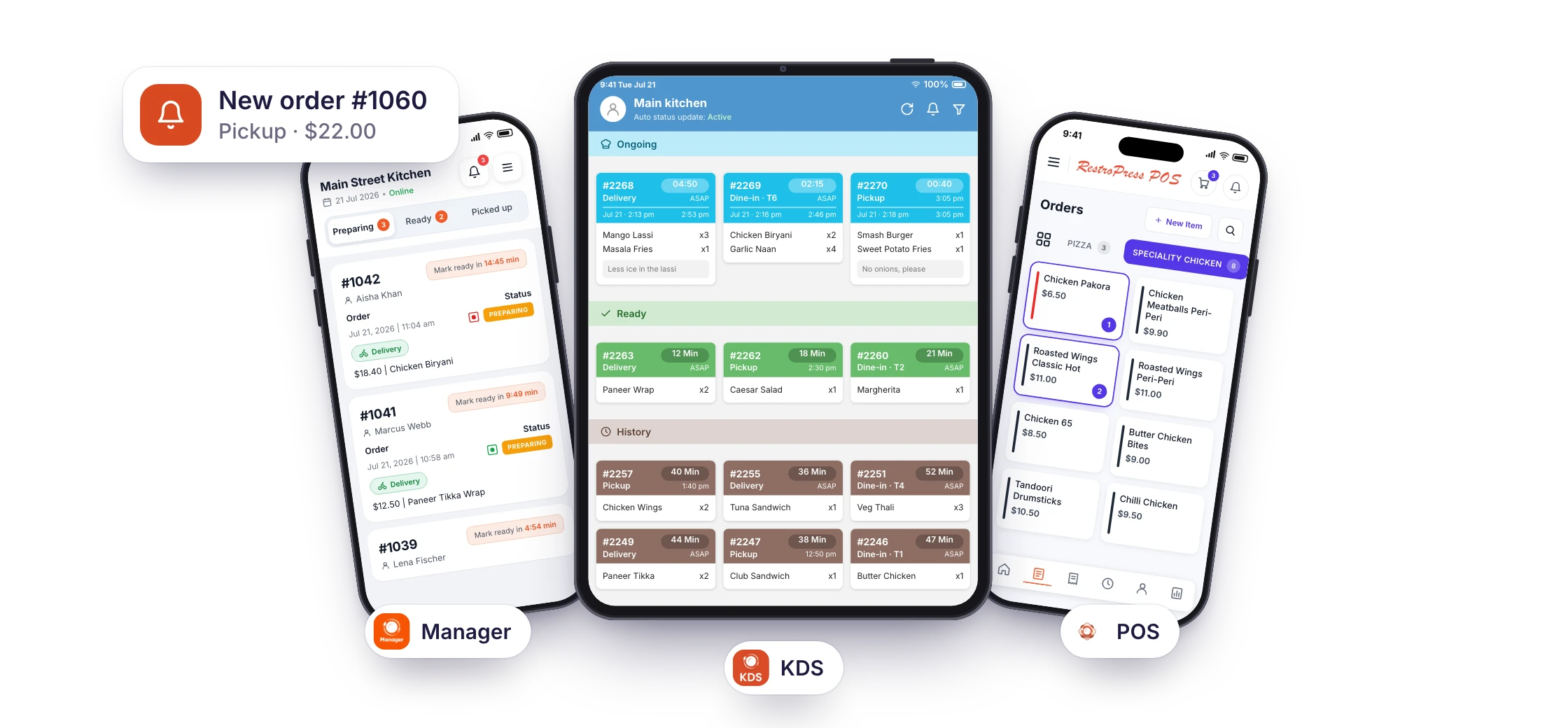
See order details, check payment status, and manage each order’s progress.

Your restaurant’s orders, managed from WordPress.

Admin sandbox access requires your email and verification.

Three RestroPress team apps, Manager and POS on phones and the KDS on a tablet, each showing its orders, with a New order #1060 alert.
Screens shown with sample data Each app has its own setup requirements

BUILT FOR RESTAURANT OWNERS

What would make the biggest difference
to your restaurant?

See how RestroPress fits your restaurant

DINE-IN · QR TABLE ORDERING

At the table?
Scan. Choose. Order.

Let guests order from their own phone while your team focuses on service. With RestroPress Dine In, each table has its own QR code.

  1. 01

    Scan to open your menu

    Guests browse in their phone’s browser. No customer app download required.

  2. 02

    Choose and place an order

    Table-specific ordering connects each order to the right table.

  3. 03

    Keep service moving

    Guests can follow order updates and call a waiter from the ordering screen.

Explore Dine-in Ordering

Requires the paid Dine In extension and a RestroPress website. See extension requirements.

Official RestroPress Dine In screen showing a food menu, an ongoing table order and a Call Waiter button.
Official Dine In interface · View full size

FOR EVERY INCOMING ORDER

RestroPress Order Tracking

A new order?
Keep it moving.

Get new-order alerts, check the details and update progress from a phone or tablet. Give your team a clear next step for every order.

  • Know when an order arrives

    Receive new-order alerts with sound and push notifications.

  • Follow its progress

    View order details and update statuses as your team works.

  • Print when you need to

    Print order receipts using supported thermal printers.

Order Tracking is included in paid plans. Requires a compatible RestroPress website and extension. Device and printer costs may apply. Compare plan inclusions.

RestroPress Order Tracking showing incoming orders, fulfilment types and status actions. RestroPress Order Tracking order details with a progress timeline, item summary and Accept order button.
Official app screens
View full size: Order list · Order progress

Need a tool for another part of service?
Explore all RestroPress apps

Start with the apps your restaurant needs. Check compatibility, setup costs and plan inclusions before choosing.

RESTROPRESS EXTENSIONS

Add more to RestroPress.

Extend your ordering setup with add-ons for delivery rules, opening hours and customer rewards.

Browse all extensions
Official RestroPress Rewards extension artworkRESTROPRESS ADD-ON

Customer loyalty

Rewards

Add a points-based loyalty programme with rewards customers can redeem at checkout.

  • Points per purchase
  • Checkout redemption

These add-ons work with your RestroPress website and are included in selected paid plans. Compare plans and inclusions.

WHY RESTROPRESS

Your restaurant.
Every way to order.

Lunch to go. Dinner delivered. A table for two. Give customers a direct way to order, wherever they enjoy your food.

PICKUPFree core ordering

Ordered online.
Collected in person.

  1. Customers choose from your menu.
  2. Your team receives and prepares the order.
  3. Customers collect from your restaurant.
Try pickup ordering
DELIVERYFree core ordering

From your menu.
To their doorstep.

  1. Customers order delivery on your site.
  2. Your team prepares the food.
  3. You arrange delivery to their door.
Explore delivery tools
DINE-INPaid extension

At their table.
On their phone.

  1. Guests scan their table’s QR code.
  2. They browse your menu and place an order.
  3. Your team prepares and serves the table.
See table ordering

Your website. Your ordering channel.

Take direct orders through your WordPress website.

No RestroPress order commission.

We don’t take a percentage of your orders.

Choose the tools you need.

Add customer, kitchen and team apps as your needs grow.

BUILD YOUR DIRECT ORDERING HABIT

Give customers a direct
way to order again.

Promote your ordering page through your website, social profiles, and customer communications. Use optional loyalty and marketing tools to encourage repeat orders.

  1. 01 / GET DISCOVERED

    Share your menu

    Put your ordering link where your customers already find you: your website, social profiles, and in-restaurant materials.

  2. 02 / TAKE THE ORDER

    Accept direct orders

    Give people a place to order pickup or delivery directly from your restaurant.

  3. 03 / BUILD THE RELATIONSHIP

    Encourage customers to return

    Use optional rewards and email tools to stay in touch with customers who choose to hear from you.

    Explore paid customer tools

You bring the customers. RestroPress gives them a direct way to order. Results depend on your promotion, service, and customer experience.

GETTING STARTED

From your menu to
your first direct order.

Start with your WordPress website. Build your ordering channel one step at a time.

  1. STEP 01

    Install RestroPress

    Add the free RestroPress plugin to your WordPress website.

    Get the free plugin
  2. STEP 02

    Configure your restaurant

    Add your menu, configure pickup and delivery, and set up payments. Add the paid Dine In extension for table ordering.

    Read the setup guide
  3. STEP 03

    Publish and promote

    Test your ordering experience, publish your menu, and share your ordering link.

    Ask our team a question

Need help getting started? Contact our team.

ROOM TO GROW

Start with the essentials.
Add tools as your needs grow.

Start with the free core plugin. Compare paid plans for additional ordering, marketing, and operational tools.

Compare Plans
FREE CORE

Your direct ordering essentials

Build your menu, accept pickup and delivery orders, and manage incoming orders.

PAID PLANS & EXTENSIONS

Tools for your next stage

Explore dine-in ordering, restaurant apps, rewards and marketing tools. Inclusions vary by plan; some integrations are sold separately.

Hosting, payment processing, and third-party services may carry separate charges.

BEFORE YOU GET STARTED

A few things
worth knowing.

Clear answers to help you decide whether RestroPress is the right online ordering system for your restaurant.

Talk to our team
Do I need a WordPress website?

Yes. RestroPress is a WordPress plugin that adds food ordering to your website. You need a WordPress installation and hosting. If you need help setting up a website, contact our team to discuss your requirements and costs.

What is included free?

The core plugin lets you build a food menu, accept pickup and delivery orders, and manage incoming orders. Advanced capabilities may need paid extensions. See the WordPress plugin listing for core features and compare plans for additional tools.

Does RestroPress charge commission?

RestroPress does not take a percentage of your orders. That does not mean your ordering setup has no costs: hosting, paid plans or extensions, payment processing, and other services may carry separate charges.

Can I accept pickup, delivery and dine-in orders?

Yes. Pickup and delivery ordering are included in the core plugin. Add the paid Dine In extension for QR table ordering. Guests use their phone browser without downloading an app. Advanced delivery tools may require paid extensions; you arrange fulfilment.

Which payments can I accept?

The core plugin lists PayPal, Stripe, and cash on delivery. Additional gateways are available through extensions. Gateway availability, fees, and payment methods depend on your country and provider. Check the payment extensions before choosing your setup.

Are apps and extensions included?

Explore the full app catalogue for customer ordering and tools for your team. Inclusions, setup and device requirements vary; apps are not all free. Review the current plan comparison and confirm the tools you need with our team. Some integrations are sold separately.

Can your team help with setup?

Yes. Start with our documentation or contact our team to discuss setup support and services. The help included and any additional costs depend on your plan and requirements.

Can I use RestroPress for a takeaway?

Yes. Takeaways, cafes, cloud kitchens and multi-location restaurants use RestroPress for collection and delivery orders. Set your opening hours, delivery areas and fees, and receive orders on your own website rather than through a marketplace.

I am switching from GloriaFood or another hosted ordering platform. Can I move to RestroPress?

Yes. RestroPress runs on your own WordPress website, so your menu, customers and ordering page stay under your control. Rebuild your menu in the free plugin, connect a payment gateway, and point your existing "Order online" links to your new page. Contact our team if you want help with the move.

Does RestroPress bring customers to my restaurant?

RestroPress provides your direct ordering tools, not a marketplace audience. You still need to promote your restaurant and ordering page. Optional rewards and marketing integrations can help you encourage repeat orders; they do not guarantee traffic or sales.

YOUR NEXT ORDER STARTS HERE

See how direct ordering could
work for your restaurant.

Explore the menu. Try the ordering experience. Decide what fits your business.